Arabic Keyboard Layout — QWERTY to Arabic 101
This is the Arabic (101) layout your operating system uses when its keyboard layout is set to Arabic: every physical key on a standard QWERTY keyboard mapped to the Arabic letter, digit, or punctuation mark it produces, in both the unshifted and Shift layers. It's also the exact mapping ArabicKeyboard.ai's wrong-keyboard suggestion uses to reverse text typed with that layout active by mistake.
Typing and suggestions are processed locally in your browser. The magnifying-glass keys search the current text on Google or YouTube; text is shared with the chosen service only when you activate that search. Read the privacy details
Examples
- Qضphysical Q key, Arabic 101 layout
- Sسphysical S key, Arabic 101 layout
- \\punctuation, unchanged
Setting up Arabic typing on your system
Add Arabic to Windows
Open Settings > Time & language > Language & region. Next to "Preferred languages," select "Add a language," search for "Arabic," pick a regional variant, then Next and Install. Windows commonly adds an Arabic keyboard as part of this, but the exact layout it selects can vary by regional variant and Windows version — check which one you actually have under Language options (the "…" next to the language, then Keyboards) and add or switch to Arabic (101) if it isn't already there; that's the layout documented on this page. (Windows 10's equivalent path is Settings > Time & Language > Language.)
Switch layouts with Windows + Space
Once a layout is installed, hold the Windows key and press Space to cycle through your installed keyboards — between English and Arabic, or between Arabic 101 and Arabic 102 AZERTY if you have both installed. You can also click the language indicator in the taskbar and pick a layout by name directly, which is faster once you have more than two installed.
Your physical keys don't need Arabic labels
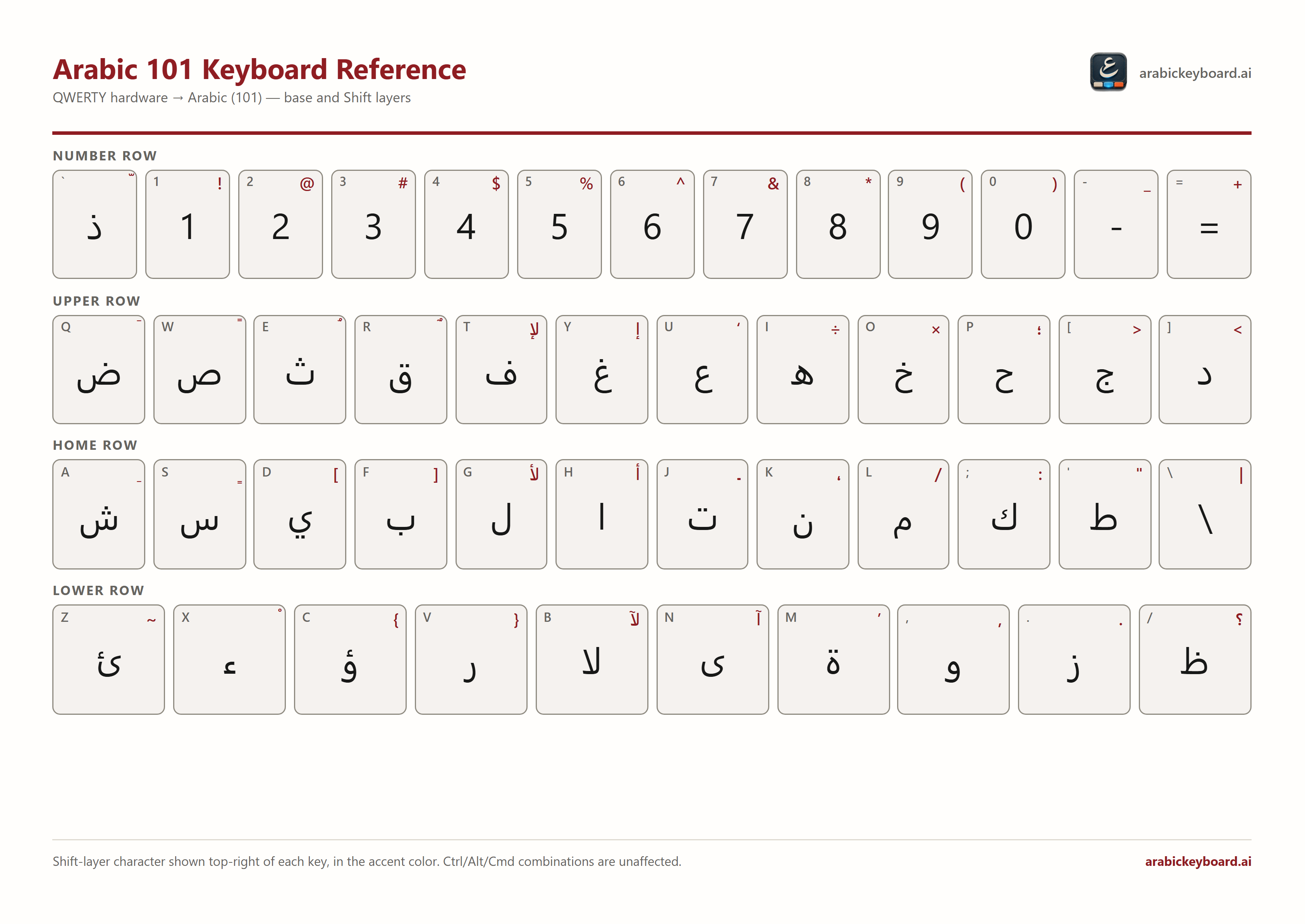
A keyboard layout is a software mapping, not something the physical keycaps enforce. Once Arabic (101) is active, the key printed "Q" always types ض — the table below shows exactly which printed key produces which Arabic letter, so you can touch-type Arabic on an ordinary Latin keyboard without relabeling or buying new keycaps.
Arabic 101 vs. Arabic 102 AZERTY — match your hardware
There's no single universal Arabic keyboard layout. Windows ships Arabic (101) for standard QWERTY hardware — the layout below — and a separate, genuinely different Arabic (102) AZERTY layout for French AZERTY hardware (see ClavierArabe.ai's AZERTY reference). They aren't the same letters shifted to new keys: the AZERTY layout's entire number row is French punctuation, and several letters sit on different keys entirely. macOS, Linux, and mobile keyboards use their own distinct Arabic layout conventions too — check what your system actually reports rather than assuming.
Finding ذ
On Arabic (101)/QWERTY, ذ (thal) sits at the key to the left of "1," above Tab — often labeled "`" / "~" on a US keyboard. It's easy to miss because that key's Latin label gives no hint of what it produces in Arabic, and compact, 60%/65%, laptop, and non-US physical keyboards sometimes omit, relocate, or double up that position. If yours doesn't have an obvious key there, check the table below for the exact position and try the equivalent physical key on your hardware.
Typing tashkeel (diacritics)
The eight Arabic diacritics live on the Shift layer of eight specific keys — the same keys shown in the Shift column below: Shift+Q for fatha (َ), Shift+W for fathatan (ً), Shift+E for damma (ُ), Shift+R for dammatan (ٌ), Shift+A for kasra (ِ), Shift+S for kasratan (ٍ), Shift+X for sukun (ْ), and Shift+"`" for shadda (ّ). If you'd rather not memorize the combinations, the Arabic keyboard with diacritics tool lets you click each mark directly.
Reference table
Listed in physical order: number row, then the upper, home, and lower letter rows. The ISO 105th key (next to left Shift, present on some keyboards) types the same backslash as the key shown before Enter.
| Physical key | Base | Shift |
|---|---|---|
| ` | ذ | ّ |
| 1 | 1 | ! |
| 2 | 2 | @ |
| 3 | 3 | # |
| 4 | 4 | $ |
| 5 | 5 | % |
| 6 | 6 | ^ |
| 7 | 7 | & |
| 8 | 8 | * |
| 9 | 9 | ) |
| 0 | 0 | ( |
| - | - | _ |
| = | = | + |
| Q | ض | َ |
| W | ص | ً |
| E | ث | ُ |
| R | ق | ٌ |
| T | ف | لإ |
| Y | غ | إ |
| U | ع | ‘ |
| I | ه | ÷ |
| O | خ | × |
| P | ح | ؛ |
| [ | ج | < |
| ] | د | > |
| A | ش | ِ |
| S | س | ٍ |
| D | ي | ] |
| F | ب | [ |
| G | ل | لأ |
| H | ا | أ |
| J | ت | ـ |
| K | ن | ، |
| L | م | / |
| ; | ك | : |
| ' | ط | " |
| \ | \ | | |
| Z | ئ | ~ |
| X | ء | ْ |
| C | ؤ | } |
| V | ر | { |
| B | لا | لآ |
| N | ى | آ |
| M | ة | ’ |
| , | و | , |
| . | ز | . |
| / | ظ | ؟ |
Supported layouts and modes
- Full Arabic 101 base and Shift layers on standard QWERTY hardware
- ArabicKeyboard.ai never remaps your physical keys — type normally, and a wrong-keyboard suggestion using this exact mapping appears only when it applies, with Apply and Dismiss
- For AZERTY hardware, see ClavierArabe.ai's AZERTY reference instead
Limitations
- This table covers the alphanumeric section only — function keys, Escape, Caps Lock, and the numeric keypad have no Arabic-specific mapping.
- Ctrl/Alt/Cmd key combinations always pass through untouched, for copy/paste and browser shortcuts.
- Shift is the only modifier layer supported; there is no AltGr/third-level layer.
Troubleshooting
Arabic letters aren't appearing
Confirm Arabic is actually installed and active — check the language indicator in the taskbar. If it isn't there yet, add it first (see above). If it's installed but nothing changes when you type, switch to it with Windows + Space or the taskbar indicator; some apps also need to be clicked back into focus after switching. As an immediate workaround, the on-screen Arabic keyboard works regardless of your system's active layout.
The wrong layout is selected
If letters appear but don't match what you expect, Arabic 102 AZERTY may be active on QWERTY hardware (or vice versa), or Windows + Space may have cycled past the layout you wanted. Click the taskbar language indicator to pick the exact layout by name instead of cycling blind. Already typed text with the wrong layout active? The wrong-keyboard converter repairs it based on physical key position.
Punctuation appears on the unexpected side
This is usually correct, not a bug. Arabic reads right-to-left, so a sentence-ending period or comma lands at the visual left edge of the line, not the right — the opposite of English. Mirrored characters like parentheses flip automatically too, to stay logically correct. If punctuation looks completely scrambled rather than simply mirrored, the text field itself may not handle right-to-left text properly — try a field built for bidirectional text, like the editor on this page.
Western vs. Arabic-Indic numerals
Whether digits appear as 0123456789 or ٠١٢٣٤٥٦٧٨٩ can depend on the application and regional numeral settings. Changing the keyboard layout alone may not change their displayed form. Check the number-format options in the application first, then the current Windows regional settings if needed.
Mixed Arabic and Latin text looks out of order
When Arabic and Latin text share a line — a name, a number, a URL — each script keeps its own reading direction while the paragraph follows the dominant one; a Latin word inside an Arabic sentence still reads left-to-right locally. This is expected Unicode bidirectional-text behavior, not corruption, though cursor movement and selection near the boundary can feel unintuitive. If the paragraph's overall direction is wrong, the app or field may need to be told explicitly that it's right-to-left (Word and most modern editors, including this page's own, handle this automatically or with a dedicated RTL control).
Updated: